

GraphQL Operations in SvelteKit
Run GraphQL queries and mutations and set database permissions while building a complete todos app with Nhost and SvelteKit.
SvelteKit GraphQL CRUD operations permissions todos app mutations queriesThis part builds upon the previous parts by demonstrating how to perform GraphQL operations with proper database permissions. You’ll learn how to design database tables, configure user permissions, and implement complete CRUD operations through GraphQL queries and mutations in a real todos application.
Full-Stack SvelteKit Development with Nhost
Section titled “Full-Stack SvelteKit Development with Nhost”Prerequisites
Section titled “Prerequisites”- Complete the User Authentication part first
- The project from the previous part set up and running
What You’ll Build
Section titled “What You’ll Build”By the end of this part, you’ll have:
- GraphQL queries and mutations for complete CRUD operations
- Database schema with proper relationships and constraints
- User permissions for secure data access control
- SvelteKit components that interact with GraphQL endpoint
Step-by-Step Guide
Section titled “Step-by-Step Guide”Create the To-Dos Table
Section titled “Create the To-Dos Table”First, we’ll perform the database changes to set up the todos table with proper schema and relationships to users.
In your Nhost project dashboard:
- Navigate to Database
- Click on SQL Console
Enter the following SQL:
CREATE TABLE public.todos (  id uuid DEFAULT gen_random_uuid() NOT NULL,  created_at timestamptz DEFAULT now() NOT NULL,  updated_at timestamptz DEFAULT now() NOT NULL,  title text NOT NULL,  details text,  completed bool DEFAULT false NOT NULL,  user_id uuid NOT NULL,  PRIMARY KEY (id),  FOREIGN KEY (user_id) REFERENCES auth.users (id) ON UPDATE CASCADE ON DELETE CASCADE);

CREATE OR REPLACE FUNCTION update_updated_at_column()RETURNS TRIGGER AS $$BEGIN  NEW.updated_at = now();  RETURN NEW;END;$$ language 'plpgsql';

CREATE TRIGGER update_todos_updated_at  BEFORE UPDATE ON public.todos  FOR EACH ROW  EXECUTE FUNCTION update_updated_at_column();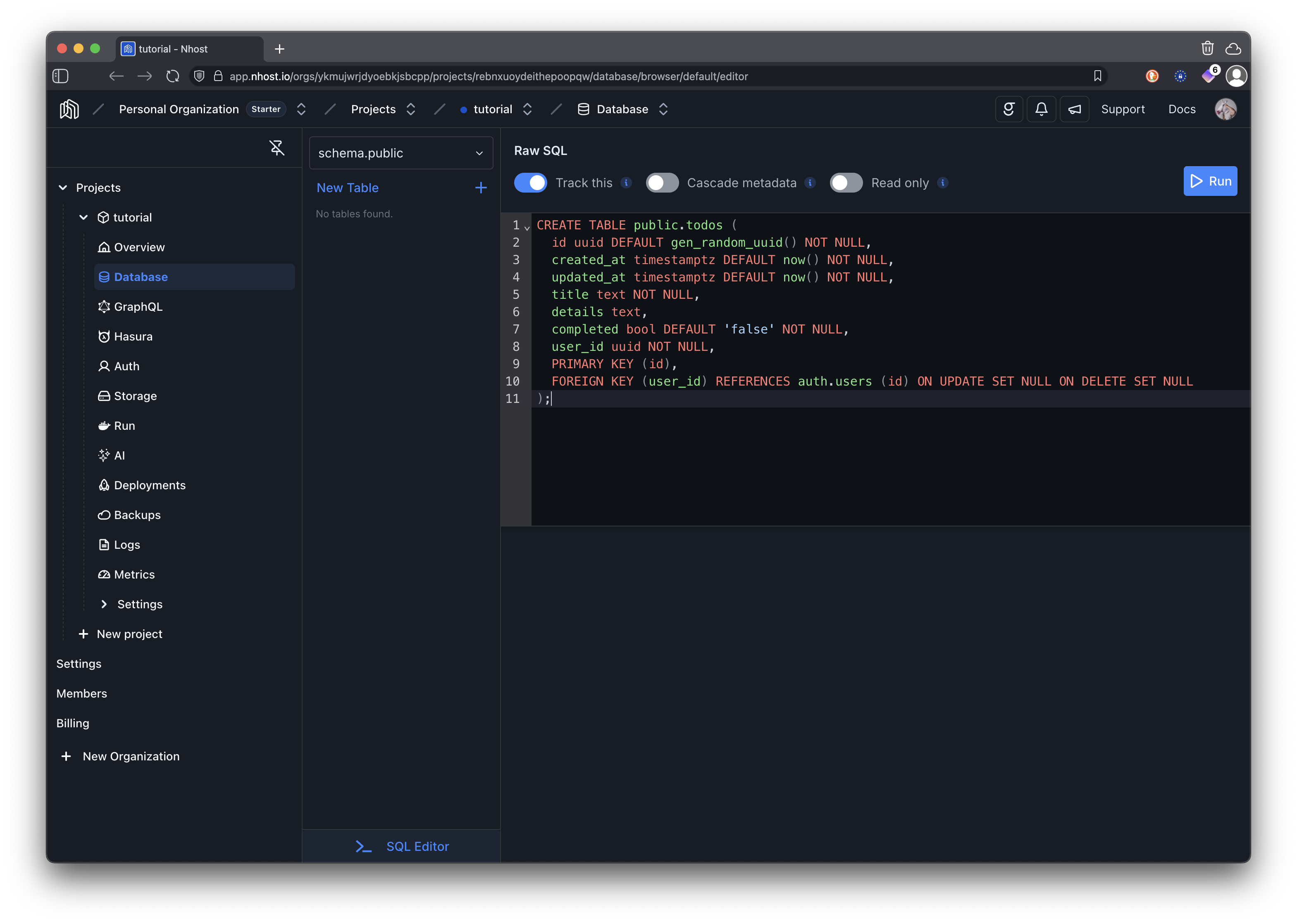
Set Up Permissions
Section titled “Set Up Permissions”It’s now time to set permission rules for the table you just created. With the table todos selected, click on …, followed by Edit Permissions.
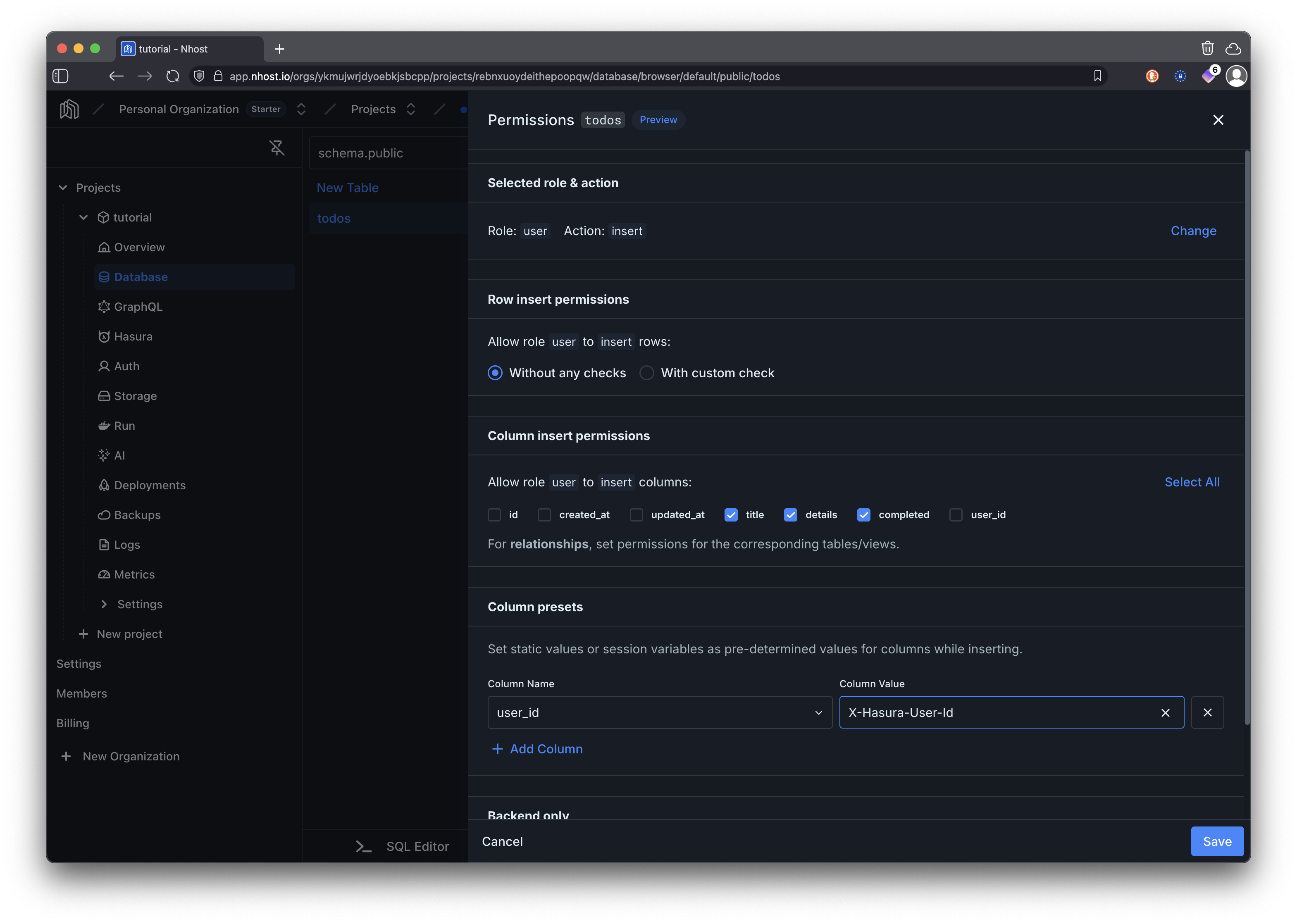
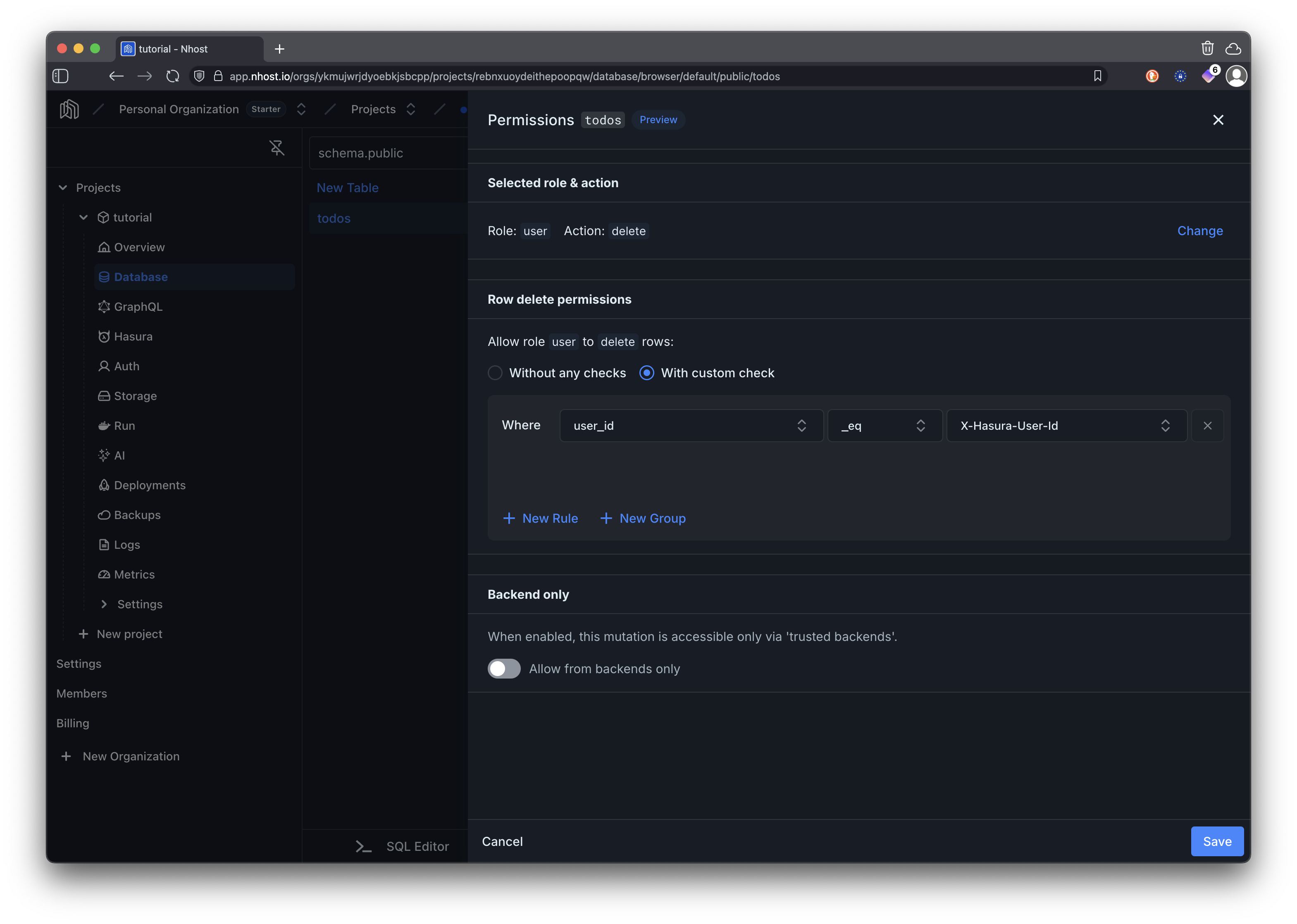
You will set permissions for the user role and actions insert, select, update, and delete.
When inserting permissions we are only allowing users to set the title, details, and completed columns as the rest of the columns are set automatically by the backend. The user_id column is configured as a preset to the currently authenticated user’s ID using the X-Hasura-User-Id session variable. This ensures that each todo is associated with the user who created it.
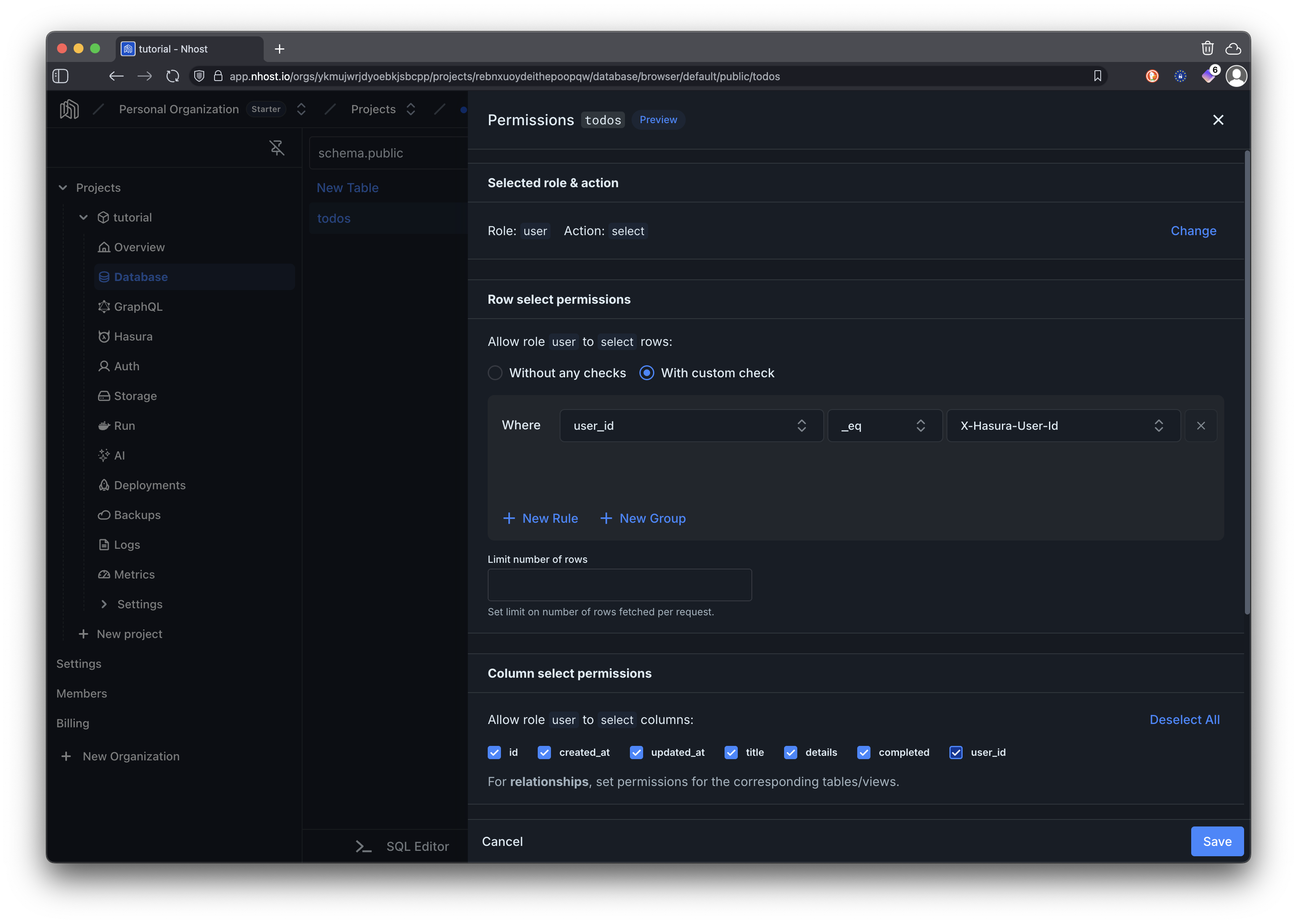
For selecting (reading) todos, we are allowing to read all columns but only for rows where the user_id matches the authenticated user’s ID. This ensures that users can only see their own todos.
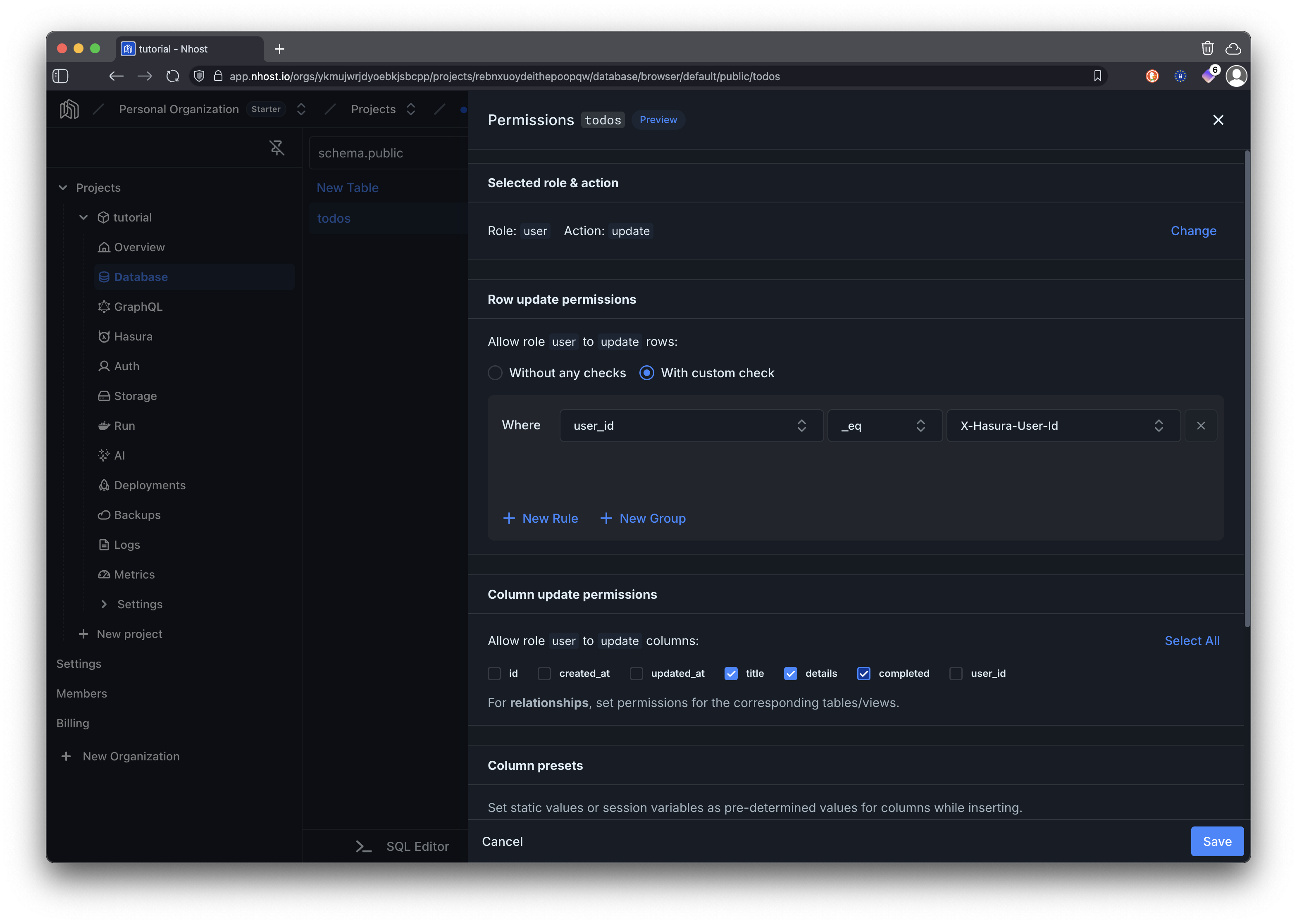
When updating todos, we are allowing users to modify the title, details, and completed columns but only for rows where the user_id matches their own ID. This prevents users from modifying todos that do not belong to them.
For deleting todos, we are allowing users to delete rows only where the user_id matches their own ID. This ensures that users cannot delete todos that belong to other users.
Create the Todos Page Component
Section titled “Create the Todos Page Component”Now let’s implement the SvelteKit page component that uses the database we just configured.
<script lang="ts">import { goto } from "$app/navigation";import { auth } from "$lib/nhost/auth";
// The interfaces below define the structure of our data// They are not strictly necessary but help with type safety
// Represents a single todo iteminterface Todo { id: string; title: string; details: string | null; completed: boolean; created_at: string; updated_at: string; user_id: string;}
// This matches the GraphQL response structure for fetching todos// Can be used as a generic type on the request methodinterface GetTodos { todos: Todo[];}
// This matches the GraphQL response structure for inserting a todo// Can be used as a generic type on the request methodinterface InsertTodo { insert_todos_one: Todo | null;}
// This matches the GraphQL response structure for updating a todo// Can be used as a generic type on the request methodinterface UpdateTodo { update_todos_by_pk: Todo | null;}
let todos = $state<Todo[]>([]);let loading = $state(true);let error = $state<string | null>(null);let newTodoTitle = $state("");let newTodoDetails = $state("");let editingTodo = $state<Todo | null>(null);let showAddForm = $state(false);let expandedTodos = $state<Set<string>>(new Set());
// Redirect if not authenticated$effect(() => { if (!$auth.isLoading && !$auth.isAuthenticated) { void goto("/signin"); }});
async function fetchTodos() { try { loading = true; // Make GraphQL request to fetch todos using Nhost client // The query automatically filters by user_id due to permissions const response = await $auth.nhost.graphql.request<GetTodos>({ query: ` query GetTodos { todos(order_by: { created_at: desc }) { id title details completed created_at updated_at user_id } } `, });
// Check for GraphQL errors in the response body if (response.body.errors) { throw new Error( response.body.errors[0]?.message || "Failed to fetch todos", ); }
// Extract todos from the GraphQL response data todos = response.body?.data?.todos || []; error = null; } catch (err) { error = err instanceof Error ? err.message : "Failed to fetch todos"; } finally { loading = false; }}
async function addTodo(e: SubmitEvent) { e.preventDefault(); if (!newTodoTitle.trim()) return;
try { // Execute GraphQL mutation to insert a new todo // user_id is automatically set based on the JWT token const response = await $auth.nhost.graphql.request<InsertTodo>({ query: ` mutation InsertTodo($title: String!, $details: String) { insert_todos_one(object: { title: $title, details: $details }) { id title details completed created_at updated_at user_id } } `, variables: { title: newTodoTitle.trim(), details: newTodoDetails.trim() || null, }, });
if (response.body.errors) { throw new Error(response.body.errors[0]?.message || "Failed to add todo"); }
if (!response.body?.data?.insert_todos_one) { throw new Error("Failed to add todo"); } todos = [response.body?.data?.insert_todos_one, ...todos]; newTodoTitle = ""; newTodoDetails = ""; showAddForm = false; error = null; } catch (err) { error = err instanceof Error ? err.message : "Failed to add todo"; }}
async function updateTodo( id: string, updates: Partial<Pick<Todo, "title" | "details" | "completed">>,) { try { // Execute GraphQL mutation to update an existing todo by primary key // Permissions ensure users can only update their own todos const response = await $auth.nhost.graphql.request<UpdateTodo>({ query: ` mutation UpdateTodo($id: uuid!, $updates: todos_set_input!) { update_todos_by_pk(pk_columns: { id: $id }, _set: $updates) { id title details completed created_at updated_at user_id } } `, variables: { id, updates, }, });
if (response.body.errors) { throw new Error( response.body.errors[0]?.message || "Failed to update todo", ); }
if (!response.body?.data?.update_todos_by_pk) { throw new Error("Failed to update todo"); }
const updatedTodo = response.body?.data?.update_todos_by_pk; if (updatedTodo) { todos = todos.map((todo) => (todo.id === id ? updatedTodo : todo)); } editingTodo = null; error = null; } catch (err) { error = err instanceof Error ? err.message : "Failed to update todo"; }}
async function deleteTodo(id: string) { if (!confirm("Are you sure you want to delete this todo?")) return;
try { // Execute GraphQL mutation to delete a todo by primary key // Permissions ensure users can only delete their own todos const response = await $auth.nhost.graphql.request({ query: ` mutation DeleteTodo($id: uuid!) { delete_todos_by_pk(id: $id) { id } } `, variables: { id, }, });
if (response.body.errors) { throw new Error( response.body.errors[0]?.message || "Failed to delete todo", ); }
todos = todos.filter((todo) => todo.id !== id); error = null; } catch (err) { error = err instanceof Error ? err.message : "Failed to delete todo"; }}
async function toggleComplete(todo: Todo) { await updateTodo(todo.id, { completed: !todo.completed });}
async function saveEdit() { if (!editingTodo) return; await updateTodo(editingTodo.id, { title: editingTodo.title, details: editingTodo.details, });}
function toggleTodoExpansion(todoId: string) { const newExpanded = new Set(expandedTodos); if (newExpanded.has(todoId)) { newExpanded.delete(todoId); } else { newExpanded.add(todoId); } expandedTodos = newExpanded;}
// Fetch todos when user session is available// The session contains the JWT token needed for GraphQL authentication$effect(() => { if ($auth.session) { fetchTodos(); }});</script>
{#if !$auth.session} <div class="auth-message"> <p>Please sign in to view your todos.</p> </div>{:else} <div class="container"> <header class="page-header"> <h1 class="page-title"> My Todos {#if !showAddForm} <button type="button" onclick={() => (showAddForm = true)} class="add-todo-btn" title="Add a new todo" > + </button> {/if} </h1> </header>
{#if error} <div class="error-message"> <strong>Error:</strong> {error} </div> {/if}
{#if showAddForm} <div class="todo-form-card"> <form onsubmit={addTodo} class="todo-form"> <h2 class="form-title">Add New Todo</h2> <div class="form-fields"> <div class="field-group"> <label for="title">Title *</label> <input id="title" type="text" bind:value={newTodoTitle} placeholder="What needs to be done?" required /> </div> <div class="field-group"> <label for="details">Details</label> <textarea id="details" bind:value={newTodoDetails} placeholder="Add some details (optional)..." rows="3" ></textarea> </div> <div class="form-actions"> <button type="submit" class="btn btn-primary"> Add Todo </button> <button type="button" onclick={() => { showAddForm = false; newTodoTitle = ""; newTodoDetails = ""; }} class="btn btn-secondary" > Cancel </button> </div> </div> </form> </div> {/if}
{#if !showAddForm} {#if loading} <div class="loading-container"> <div class="loading-content"> <div class="spinner"></div> <span class="loading-text">Loading todos...</span> </div> </div> {:else} <div class="todos-list"> {#if todos.length === 0} <div class="empty-state"> <svg class="empty-icon" fill="none" stroke="currentColor" viewBox="0 0 24 24" aria-hidden="true" > <path stroke-linecap="round" stroke-linejoin="round" stroke-width="1.5" d="M9 5H7a2 2 0 00-2 2v10a2 2 0 002 2h8a2 2 0 002-2V7a2 2 0 00-2-2h-2M9 5a2 2 0 002 2h2a2 2 0 002-2M9 5a2 2 0 012-2h2a2 2 0 012 2" /> </svg> <h3 class="empty-title">No todos yet</h3> <p class="empty-description"> Create your first todo to get started! </p> </div> {:else} {#each todos as todo (todo.id)} <div class="todo-card {todo.completed ? 'completed' : ''}"> {#if editingTodo?.id === todo.id} <div class="todo-edit"> <div class="edit-fields"> <div class="field-group"> <label for="edit-title">Title</label> <input id="edit-title" type="text" bind:value={editingTodo.title} /> </div> <div class="field-group"> <label for="edit-details">Details</label> <textarea id="edit-details" bind:value={editingTodo.details} rows="3" ></textarea> </div> <div class="edit-actions"> <button type="button" onclick={saveEdit} class="btn btn-primary" > ✓ Save Changes </button> <button type="button" onclick={() => (editingTodo = null)} class="btn btn-cancel" > ✕ Cancel </button> </div> </div> </div> {:else} <div class="todo-content"> <div class="todo-header"> <button type="button" class="todo-title-btn {todo.completed ? 'completed' : ''}" onclick={() => toggleTodoExpansion(todo.id)} > {todo.title} </button> <div class="todo-actions"> <button type="button" onclick={() => toggleComplete(todo)} class="action-btn action-btn-complete" title={todo.completed ? "Mark as incomplete" : "Mark as complete"} > {todo.completed ? "↶" : "✓"} </button> <button type="button" onclick={() => (editingTodo = todo)} class="action-btn action-btn-edit" title="Edit todo" > ✏️ </button> <button type="button" onclick={() => deleteTodo(todo.id)} class="action-btn action-btn-delete" title="Delete todo" > 🗑️ </button> </div> </div>
{#if expandedTodos.has(todo.id)} <div class="todo-details"> {#if todo.details} <div class="todo-description {todo.completed ? 'completed' : ''}"> <p>{todo.details}</p> </div> {/if}
<div class="todo-meta"> <div class="meta-dates"> <span class="meta-item"> Created: {new Date(todo.created_at).toLocaleString()} </span> <span class="meta-item"> Updated: {new Date(todo.updated_at).toLocaleString()} </span> </div> {#if todo.completed} <div class="completion-badge"> <svg class="completion-icon" fill="none" stroke="currentColor" viewBox="0 0 24 24" aria-hidden="true" > <path stroke-linecap="round" stroke-linejoin="round" stroke-width="2" d="M9 12l2 2 4-4m6 2a9 9 0 11-18 0 9 9 0 0118 0z" /> </svg> <span>Completed</span> </div> {/if} </div> </div> {/if} </div> {/if} </div> {/each} {/if} </div> {/if} {/if} </div>{/if}Update Navigation Links
Section titled “Update Navigation Links”Add a link to the todos page in the navigation layout. Update your src/routes/+layout.svelte file to include the todos link:
<script lang="ts">import { onMount } from "svelte";import { goto } from "$app/navigation";import { page } from "$app/stores";import { auth, initializeAuth, nhost } from "$lib/nhost/auth";import "../app.css";
let { children }: { children?: import("svelte").Snippet } = $props();
// Initialize auth when component mountsonMount(() => { return initializeAuth();});
// Helper function to determine if a link is activefunction isActive(path: string): string { return $page.url.pathname === path ? "nav-link active" : "nav-link";}
async function handleSignOut() { if ($auth.session) { await nhost.auth.signOut({ refreshToken: $auth.session.refreshToken, }); void goto("/"); }}</script>
<div id="root"> <nav class="navigation"> <div class="nav-container"> <a href="/" class="nav-logo">Nhost SvelteKit Demo</a>
<div class="nav-links"> <a href="/" class="nav-link">Home</a>
{#if $auth.isAuthenticated} <a href="/todos" class={isActive('/todos')}>Todos</a> <a href="/profile" class={isActive('/profile')}>Profile</a> <button onclick={handleSignOut} class="nav-link nav-button" > Sign Out </button> {:else} <a href="/signin" class="nav-link {isActive('/signin')}"> Sign In </a> <a href="/signup" class="nav-link {isActive('/signup')}"> Sign Up </a> {/if} </div> </div> </nav>
<div class="app-content"> {#if children} {@render children()} {/if} </div></div>Test Your Complete Application
Section titled “Test Your Complete Application”Run your SvelteKit application and test all the functionality:
npm run devThings to try out:
- Try signing in and out and see how the Todos page is only available when authenticated
- Create, view, edit, complete, and delete todos. See how the UI updates accordingly
- Open the application in another browser or incognito window, sign in with a different account and verify that you cannot see or modify todos from the first account
Key Features Implemented
Section titled “Key Features Implemented”Database Schema
Properly designed todos table with constraints, indexes, and automatic timestamp updates for optimal performance.
GraphQL API
Auto-generated GraphQL API with queries and mutations for full CRUD operations on todos.
Row-Level Security
Comprehensive permissions ensuring users can only access their own todos through all GraphQL operations.
CRUD Operations
Complete Create, Read, Update, Delete functionality with proper error handling and user feedback.
Rich Interface
Expandable todo items, inline editing, completion status, and detailed timestamps using SvelteKit’s reactive UI patterns.