

Configuring Cron Triggers
Call a webhook on a recurring schedule defined by a cron expression
cron cron trigger scheduled recurring background jobs periodic webhookCron triggers call a webhook on a recurring schedule defined by a cron expression. Use them for periodic background jobs — cleanup tasks, report generation, digest emails, or data checks.
Cron Expression Syntax
Section titled “Cron Expression Syntax”Expressions follow the format minute hour day-of-month month day-of-week and run in UTC.
| Expression | Description |
|---|---|
* * * * * | Every minute |
*/5 * * * * | Every 5 minutes |
*/30 * * * * | Every 30 minutes |
0 * * * * | Every hour (at minute 0) |
0 0 * * * | Daily at midnight |
0 9 * * 1-5 | Weekdays at 9:00 AM |
The dashboard provides preset suggestions matching these common patterns.
Creating a Cron Trigger
Section titled “Creating a Cron Trigger”Navigate to Events → Cron Triggers, then click New Cron Trigger.

| Field | Description |
|---|---|
| Cron Trigger Name | Unique identifier (e.g. stale_todos_check) |
| Comment | Optional description of what the trigger does |
| Webhook URL or template | Endpoint URL. Supports {{ENV_VAR}} syntax (e.g. {{NHOST_FUNCTIONS_URL}}/events/stale-todos) |
| Schedule (Cron Expression) | Cron expression with preset suggestions dropdown |
| Payload | JSON object sent in the webhook body |
| Retry and Headers Settings (accordion) | Retry count, interval, timeout, tolerance (max seconds a late invocation can still fire), and custom HTTP headers |
| Request Options (accordion) | Request options transform and payload transform (see Transformations) |
Cron triggers are defined in nhost/metadata/cron_triggers.yaml.
| Field | Description |
|---|---|
name | Unique identifier (e.g. stale_todos_check) |
webhook | Endpoint URL, supports {{ENV_VAR}} syntax (e.g. {{NHOST_FUNCTIONS_URL}}/events/stale-todos) |
schedule | Cron expression (UTC) |
include_in_metadata | Whether this trigger is managed via metadata (true / false) |
payload | JSON object sent in the webhook body |
retry_conf.num_retries | Number of retry attempts on failure |
retry_conf.retry_interval_seconds | Seconds between retry attempts |
retry_conf.timeout_seconds | Seconds before the request times out |
retry_conf.tolerance_seconds | Max seconds a late invocation can still fire |
headers | List of HTTP headers. Each entry has a name and either value (literal) or value_from_env (env variable) |
comment | Optional description of what the trigger does |
This example runs every 5 minutes (see the full cron_triggers.yaml):
- name: stale_todos_check webhook: '{{NHOST_FUNCTIONS_URL}}/events/stale-todos' schedule: '*/5 * * * *' include_in_metadata: true payload: {} retry_conf: num_retries: 3 retry_interval_seconds: 10 timeout_seconds: 60 tolerance_seconds: 21600 headers: - name: nhost-webhook-secret value_from_env: NHOST_WEBHOOK_SECRET comment: Checks for incomplete todos not updated in 7+ days, marks them stale, and notifies owners.Webhook Handler
Section titled “Webhook Handler”Cron triggers deliver an HTTP request to any endpoint. The default method is POST, but you can change it using request transformations. The request body contains a payload field with the JSON you configured, not database row data.
Webhook Payload
Section titled “Webhook Payload”Cron triggers deliver schedule metadata and the custom JSON payload you configured in the trigger definition.
{ "scheduled_time": "2024-01-15T12:00:00.000Z", "payload": {}, "name": "stale_todos_check", "comment": "Checks for incomplete todos not updated in 7+ days, marks them stale, and notifies owners."}| Field | Description |
|---|---|
scheduled_time | ISO 8601 timestamp of the scheduled invocation (UTC) |
payload | The JSON object configured in the trigger definition |
name | The cron trigger name |
comment | The optional comment/description from the trigger definition |
For working handler examples, see:
- Stale Todo Cleanup — detect and flag stale todos on a schedule
- Webhook Security — validate the shared secret in your handler
- Using the Nhost SDK — query your database from inside a handler
Managing Cron Triggers
Section titled “Managing Cron Triggers”The cron trigger sidebar in Events > Cron Triggers lists all triggers. Each trigger has Edit and Delete actions.
Selecting a trigger opens its detail page with two tabs:
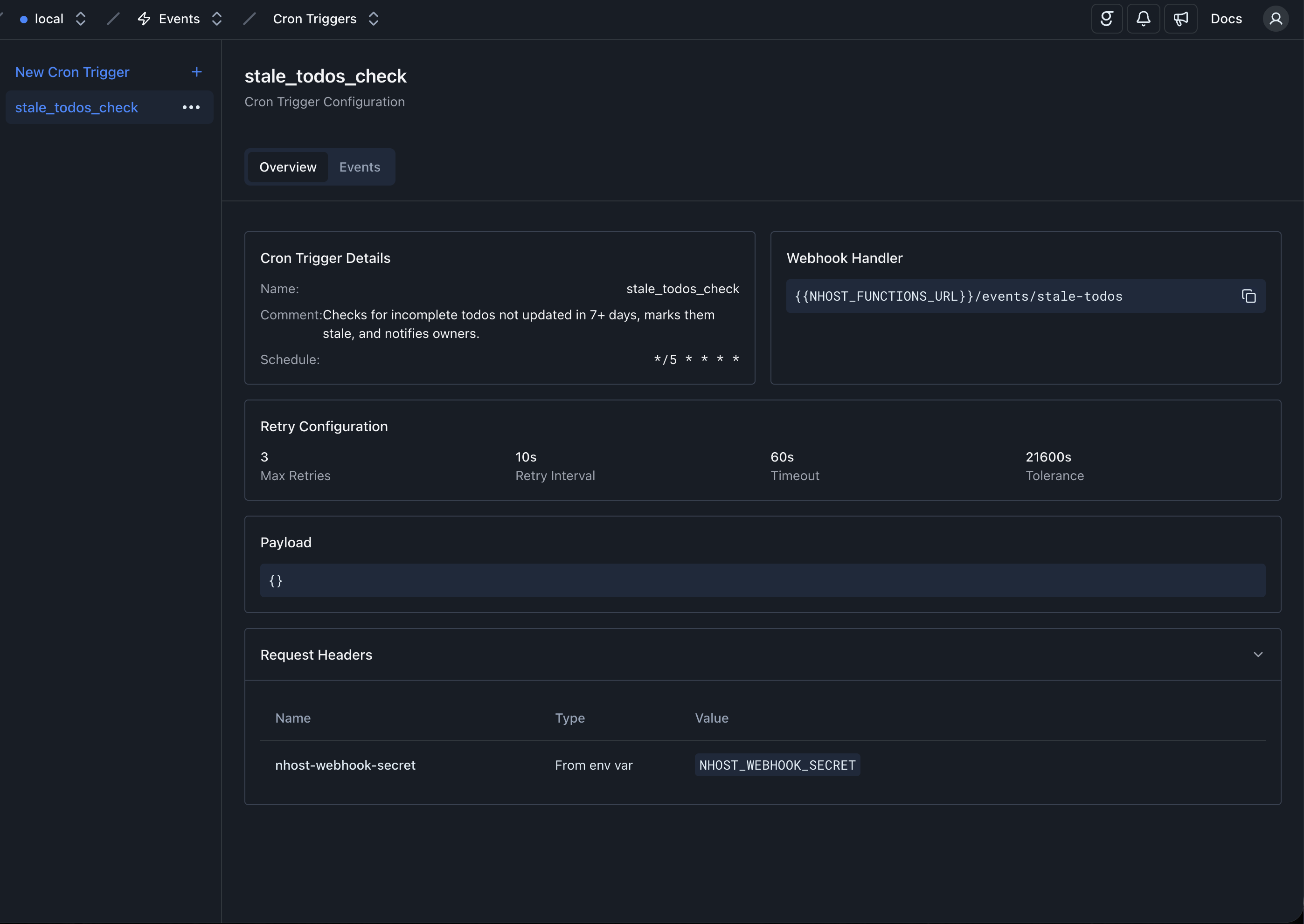
Overview
Section titled “Overview”Displays the trigger configuration: name, comment, schedule, webhook URL, retry settings (including tolerance), payload, request headers, and transformation configuration.
Events
Section titled “Events”Lists all scheduled invocations for this cron trigger. Filter by status using the “Status” header buttons at the top: Scheduled, Processed, Failed, or All.

Each event shows its scheduled time, status, ID, and number of tries. Scheduled events that have not yet fired can be deleted individually.
Expand an event to see its invocation logs. Each invocation shows the HTTP status code and a View Details action that opens the full request and response.