Configuring Event Triggers
Fire webhooks when database rows are inserted, updated, or deleted
event triggers database events webhooks insert update delete webhook handlerEvent triggers fire a webhook whenever a row in a tracked table is inserted, updated, or deleted. The webhook receives the old and new row data, letting your handler react to exactly what changed.
Creating an Event Trigger
Section titled “Creating an Event Trigger”Navigate to Events > Event Triggers and click New Event Trigger.
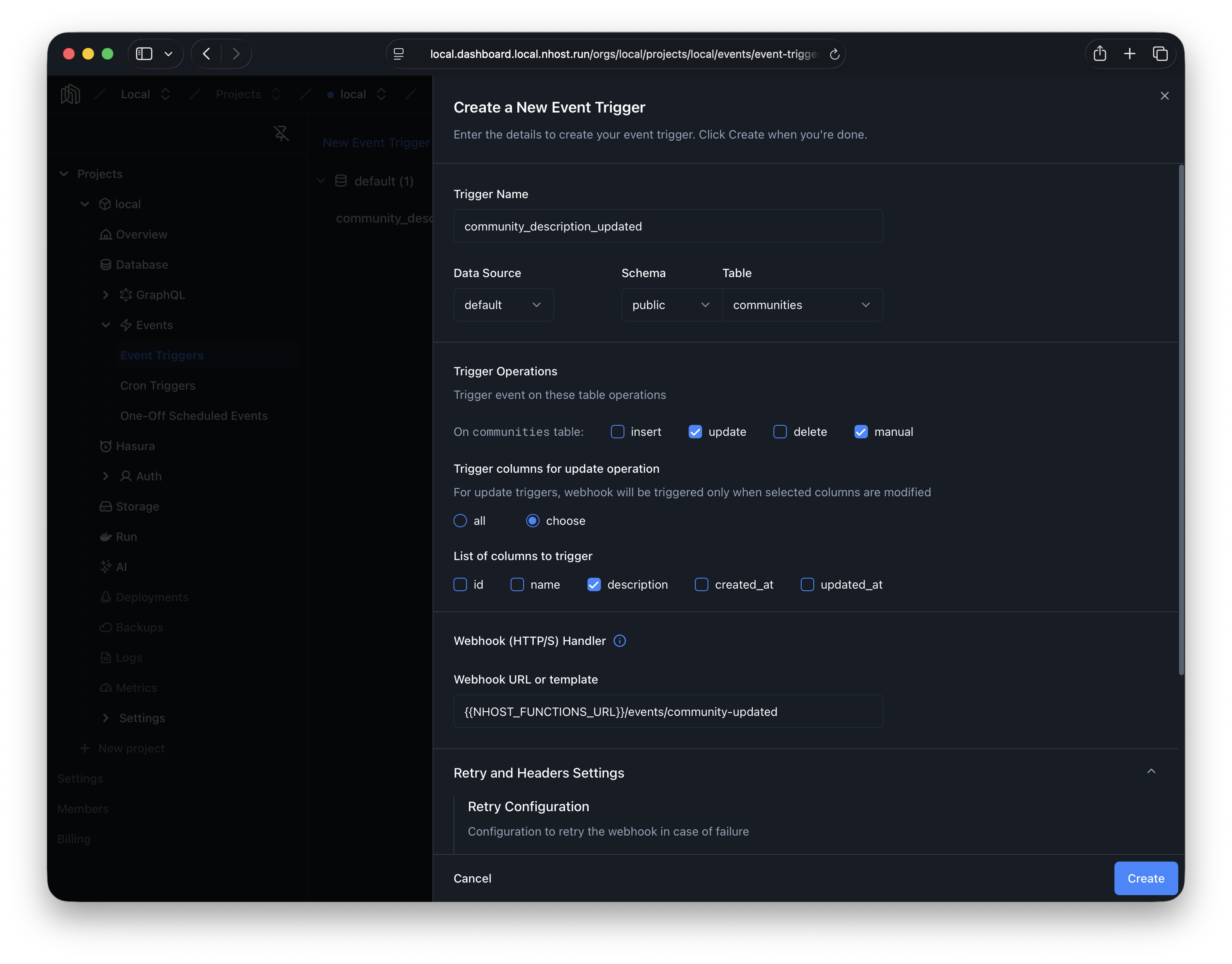
| Field | Description |
|---|---|
| Trigger Name | Unique identifier (e.g. community_description_updated) |
| Data Source | The database to monitor (typically default) |
| Schema / Table | Database schema and table to watch |
| Trigger Operations | Checkboxes: Insert, Update, Delete, Manual |
| Update Columns | When Update is selected — all columns or specific columns |
| Webhook URL or template | Endpoint URL, supports {{ENV_VAR}} syntax (e.g. {{NHOST_FUNCTIONS_URL}}/events/your-handler) |
| Retry and Headers Settings | Retry count, interval, timeout, and custom HTTP headers |
| Configure Transformation | Request options transform and payload transform (see Transformations) |
Event triggers are defined in the table’s metadata YAML file under the event_triggers key.
| Field | Description |
|---|---|
name | Unique identifier (e.g. community_description_updated) |
definition.enable_manual | Allow manual invocation via the API or dashboard (true / false) |
definition.insert | Listen for insert operations. Set columns: "*" to track all columns |
definition.update | Listen for update operations. Provide a columns list to filter which column changes fire the trigger |
definition.delete | Listen for delete operations. Set columns: "*" to track all columns |
webhook | Endpoint URL, supports {{ENV_VAR}} syntax (e.g. {{NHOST_FUNCTIONS_URL}}/events/your-handler) |
retry_conf.num_retries | Number of retry attempts on failure |
retry_conf.interval_sec | Seconds between retry attempts |
retry_conf.timeout_sec | Seconds before the request times out |
headers | List of HTTP headers. Each entry has a name and either value (literal) or value_from_env (env variable) |
This example watches the description column of the communities table (see the full public_communities.yaml):
event_triggers: - name: community_description_updated definition: enable_manual: true update: columns: - description retry_conf: interval_sec: 10 num_retries: 3 timeout_sec: 60 webhook: '{{NHOST_FUNCTIONS_URL}}/events/community-updated' headers: - name: nhost-webhook-secret value_from_env: NHOST_WEBHOOK_SECRETTrigger Operations
Section titled “Trigger Operations”| Operation | Fires When | Payload |
|---|---|---|
| Insert | A new row is inserted | old is null, new contains the inserted row |
| Update | A row is updated (optionally filtered to specific columns) | old contains the previous row, new contains the updated row |
| Delete | A row is deleted | old contains the deleted row, new is null |
| Manual | Invoked via the metadata API (pg_invoke_event_trigger) | old is null, new contains the current row |
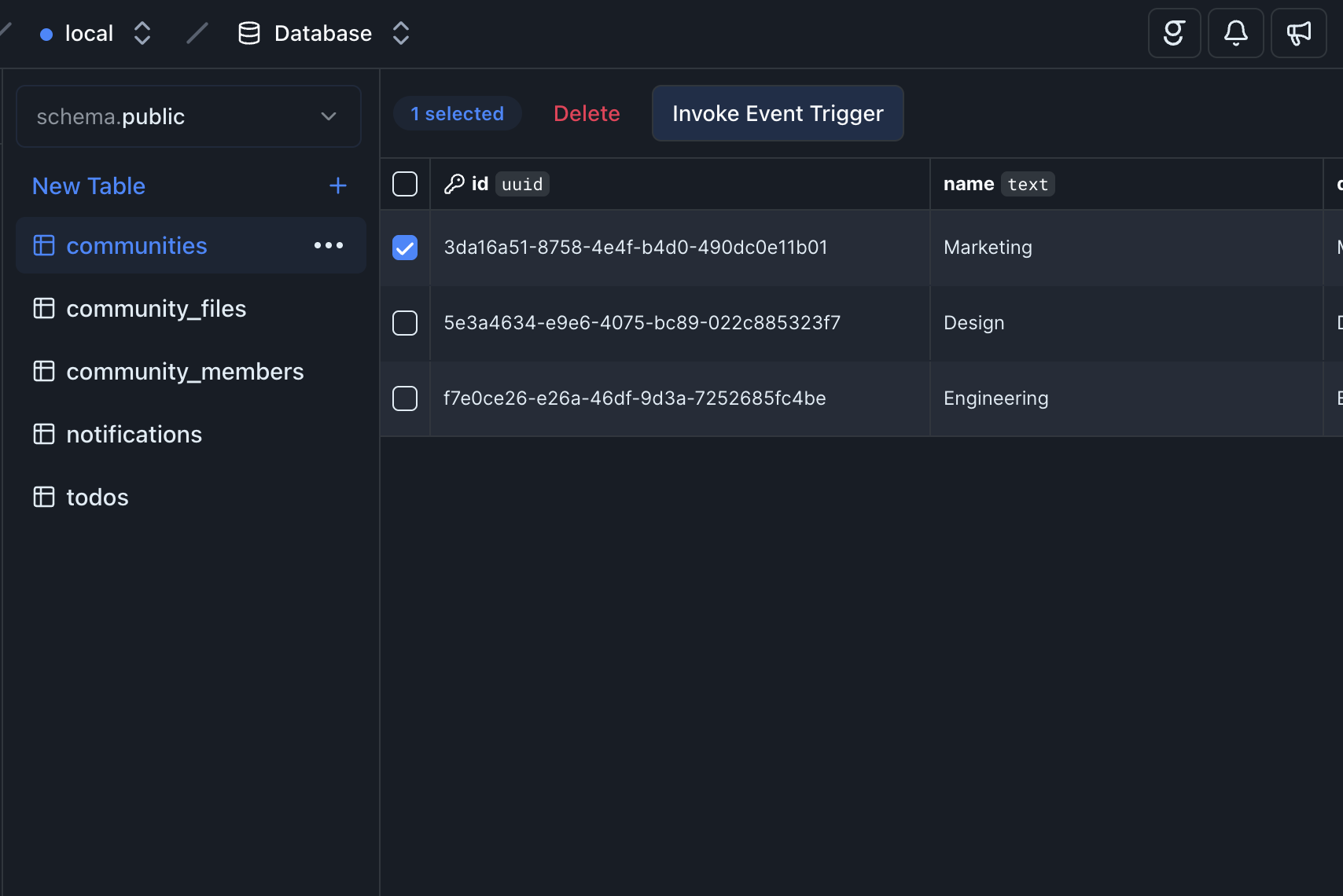
The Manual operation enables on-demand invocation from the dashboard. When browsing a table in the Database section, select a row and click Invoke Event Trigger in the toolbar. A dropdown lists all event triggers for that table — triggers with Manual enabled can be invoked with the selected row’s data as the payload. Triggers without Manual enabled appear disabled with a lock icon.
Webhook Handler
Section titled “Webhook Handler”The webhook target can be any HTTP endpoint that returns a 2xx status code. By default, events are delivered as POST requests, but you can change the HTTP method using request transformations.
Webhook Payload
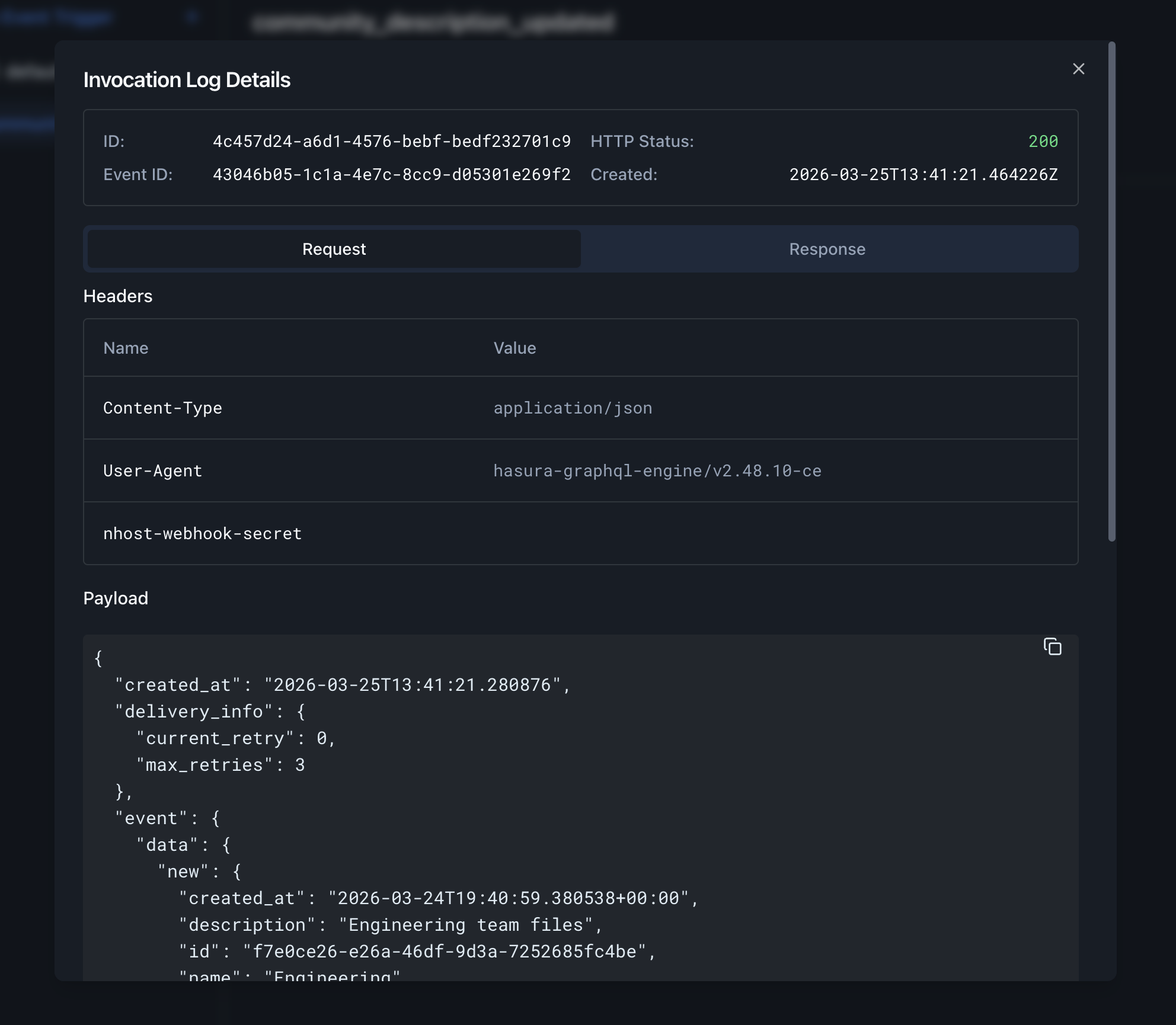
Section titled “Webhook Payload”Event triggers deliver the old and new row data, the operation type, and session variables identifying who made the change.
{ "id": "a1b2c3d4-e5f6-7890-abcd-ef1234567890", "created_at": "2026-03-25T12:00:00.000Z", "event": { "op": "UPDATE", "data": { "old": { "id": "community-123", "description": "Old description" }, "new": { "id": "community-123", "description": "New description" } }, "session_variables": { "x-hasura-role": "user", "x-hasura-user-id": "user-456" }, "trace_context": { "span_id": "abc123", "trace_id": "def456" } }, "delivery_info": { "current_retry": 0, "max_retries": 3 }, "trigger": { "name": "community_description_updated" }, "table": { "schema": "public", "name": "communities" }}| Field | Description |
|---|---|
id | Unique event UUID |
created_at | Timestamp when the event was created |
event.op | Operation type: INSERT, UPDATE, DELETE, or MANUAL |
event.data.old | Previous row data (null for inserts; null for manual triggers) |
event.data.new | Updated row data (null for deletes) |
event.session_variables | Session variables of the user who triggered the change |
event.trace_context | Trace context with span_id and trace_id |
delivery_info | Current retry attempt and max retries configured |
trigger.name | Name of the event trigger |
table.schema | Schema of the table that triggered the event |
table.name | Name of the table that triggered the event |
For working handler examples, see:
- Community Notifications — notify members when a community description changes
- Webhook Security — validate the shared secret in your handler
- Using the Nhost SDK — query your database from inside a handler
Managing Event Triggers
Section titled “Managing Event Triggers”The event trigger sidebar in Events > Event Triggers lists all triggers. Each trigger has Edit and Delete actions.
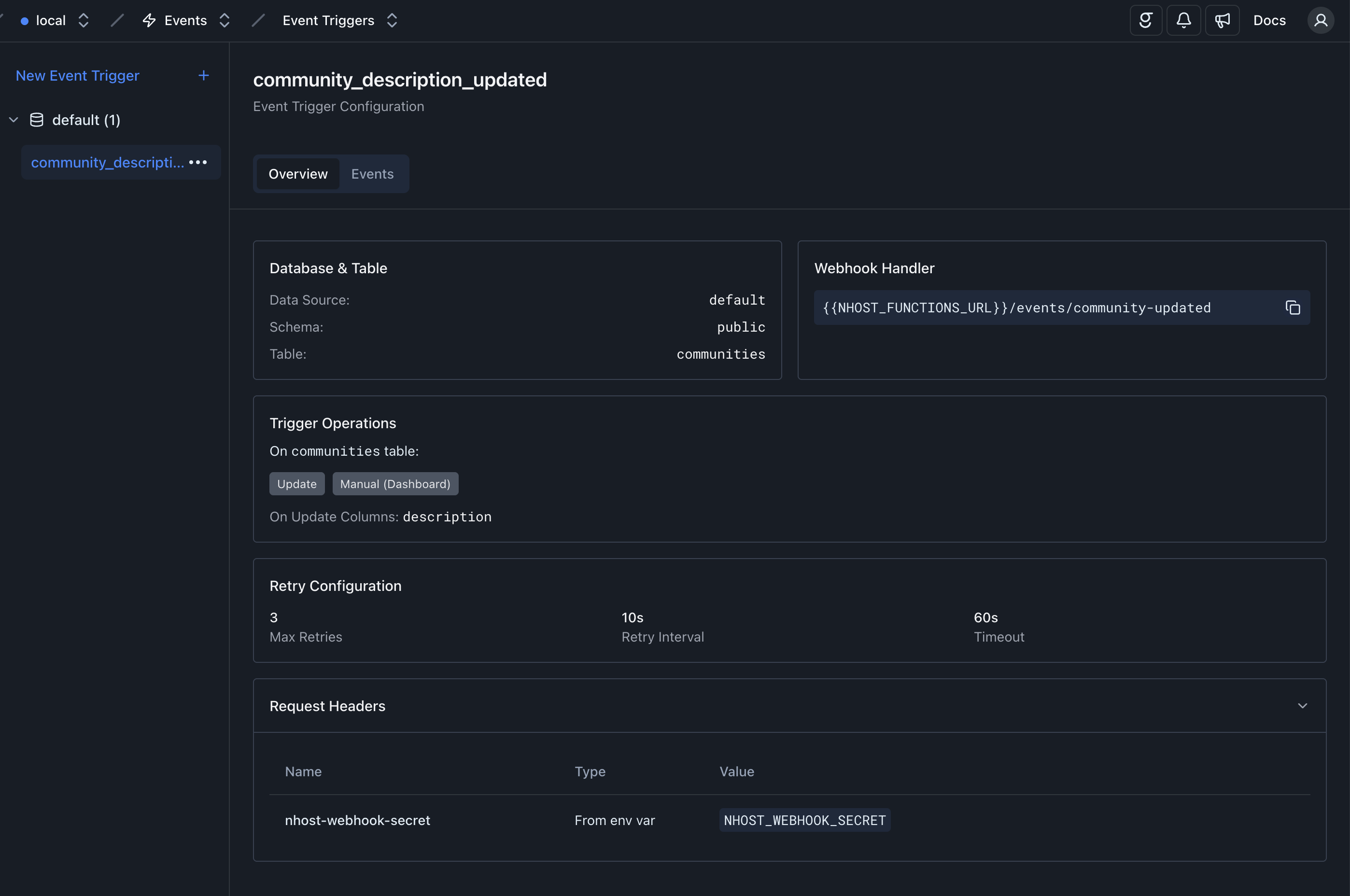
Selecting a trigger opens its detail page with two tabs:
Overview
Section titled “Overview”Displays the trigger configuration: data source, schema, table, webhook URL, trigger operations, update columns, retry settings, request headers, and transformation configuration.
Events
Section titled “Events”Lists all events fired by this trigger. Each event shows its created time, delivery status, ID, and number of tries.

Expand an event to see its invocation logs. Each invocation shows the HTTP status code and has two actions:
- Redeliver — re-sends the webhook for that invocation
- View Details — opens the full request and response (URL, method, headers, body, status)