

Computed Fields
Expose Postgres function results as virtual columns in your GraphQL API
computed fields Postgres functions virtual columns GraphQL schema derived fields session argumentA computed field adds a virtual column to a table in your GraphQL API. Its value is calculated on demand by a Postgres function that receives the row, so clients can query it like any other column — and permissions can reference it the same way. No extra data is stored in the database; the field exists only in the API layer.
Use Cases
Section titled “Use Cases”- Derived values — combine columns into a single field, e.g.
full_name,age,slug. - Per-user state — return a value that depends on the current session, e.g.
is_liked_by_meon apoststable, using the session argument. - Parameterized values — accept query-time arguments, e.g. a product’s price with a discount percentage applied.
- Custom search — return a boolean from a function that runs
to_tsvectoragainst several columns. - Filtered sub-lists — a function returning
SETOF <tracked_table>exposes a parameter-driven list, e.g. an author’s articles matching a search term.
For working SQL, see Example Functions below.
Requirements for Postgres Functions
Section titled “Requirements for Postgres Functions”A function can be used to support a computed field when all of the following are true:
- It takes a row of the table as one of its arguments.
- Every input argument is a base scalar (a built-in Postgres primitive like
text,int, orboolean) or a row type (composite). Pseudo, enum, domain, and range types are not supported. - It is marked
STABLEorIMMUTABLE.VOLATILEfunctions are not allowed — a computed field must produce the same result for the same input within a transaction. - It is not variadic and is not an aggregate.
- It returns either a scalar (base) type or
SETOF <tracked_table>.
The dashboard’s function picker hides functions with the wrong arguments or a VOLATILE marker. The return type isn’t checked until you submit, so a function with an unsupported return type still appears in the list and is only rejected when you add it.
Example Functions
Section titled “Example Functions”Derived values
Section titled “Derived values”A row in, a scalar out — combine columns into a single field. This example builds a full name from the user’s first and last name.
CREATE OR REPLACE FUNCTION public.user_full_name(user_row public.users)RETURNS textLANGUAGE sqlSTABLEAS $$ SELECT user_row.first_name || ' ' || user_row.last_name;$$;Per-user state
Section titled “Per-user state”Read a session variable for per-user state, bound with the Session Argument setting. The function below reports whether the current session’s user has liked the post.
CREATE OR REPLACE FUNCTION public.post_is_liked_by_me( post_row public.posts, user_session json)RETURNS booleanLANGUAGE sqlSTABLEAS $$ SELECT EXISTS ( SELECT 1 FROM public.post_likes WHERE post_likes.post_id = post_row.id AND post_likes.user_id = (user_session ->> 'x-hasura-user-id')::uuid );$$;Parameterized values
Section titled “Parameterized values”Arguments beyond the row become query-time arguments on the field, passed under an args input object — for instance, applying a discount percentage to a product’s price.
CREATE OR REPLACE FUNCTION public.product_discounted_price( product_row public.products, discount_pct numeric)RETURNS numericLANGUAGE sqlIMMUTABLEAS $$ SELECT round(product_row.price * (1 - discount_pct / 100), 2);$$;Custom search
Section titled “Custom search”Return a boolean from a full-text search over several columns, such as checking whether an article matches a search query.
CREATE OR REPLACE FUNCTION public.article_matches( article_row public.articles, query text)RETURNS booleanLANGUAGE sqlSTABLEAS $$ SELECT to_tsvector('english', article_row.title || ' ' || article_row.body) @@ plainto_tsquery('english', query);$$;Filtered sub-lists
Section titled “Filtered sub-lists”Return SETOF <tracked_table> for a parameter-driven nested list that respects the table’s permissions, like an author’s articles whose title matches a search term.
CREATE OR REPLACE FUNCTION public.author_articles( author_row public.authors, search text)RETURNS SETOF public.articlesLANGUAGE sqlSTABLEAS $$ SELECT * FROM public.articles WHERE articles.author_id = author_row.id AND articles.title ILIKE '%' || search || '%';$$;Adding a Computed Field
Section titled “Adding a Computed Field”-
Open the table’s GraphQL settings
In the dashboard, go to Database, pick the table in the sidebar, open its
⋯menu, and choose Edit GraphQL. Scroll to the Computed Fields section.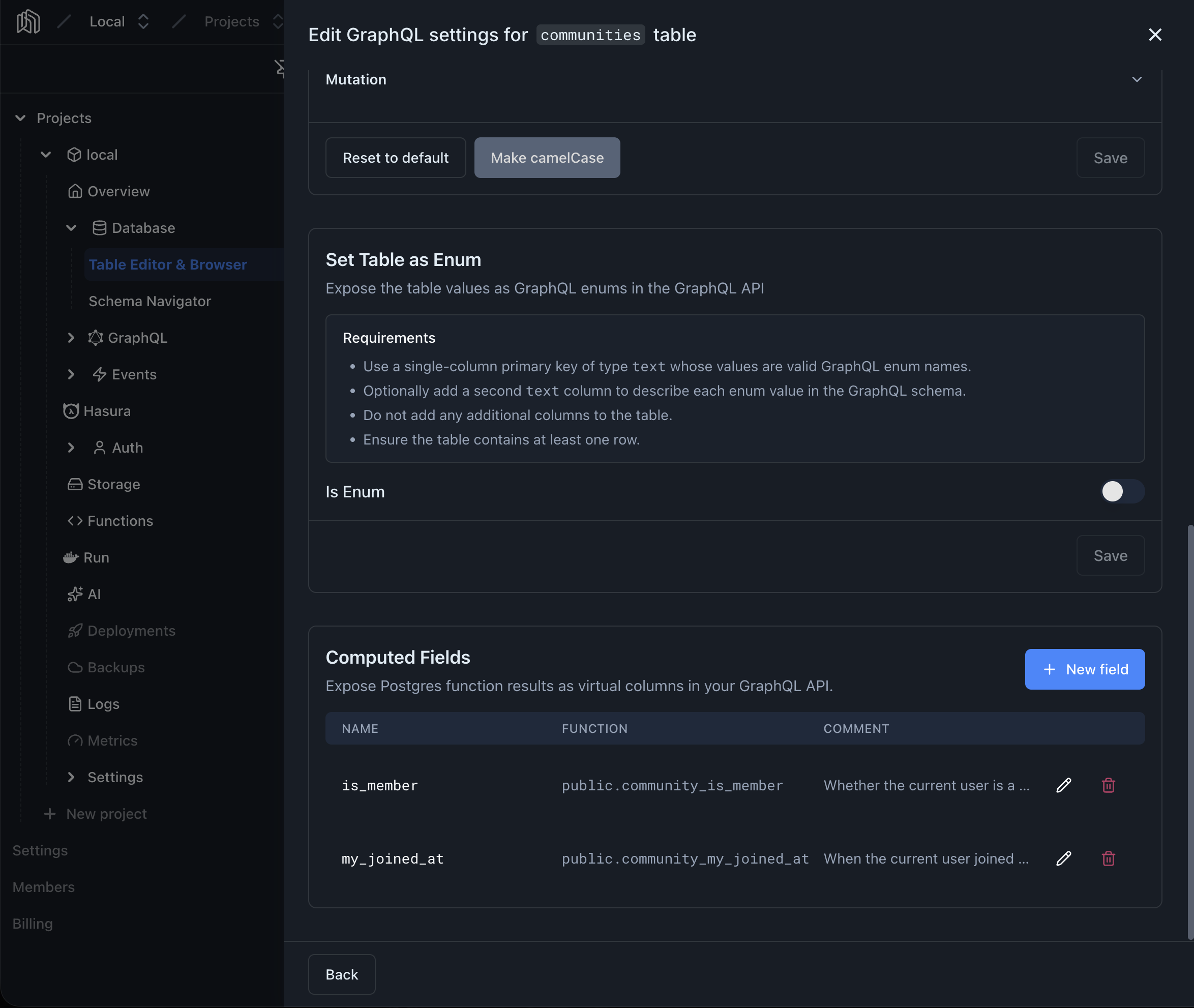
-
Open the form
Click New field to open the form.
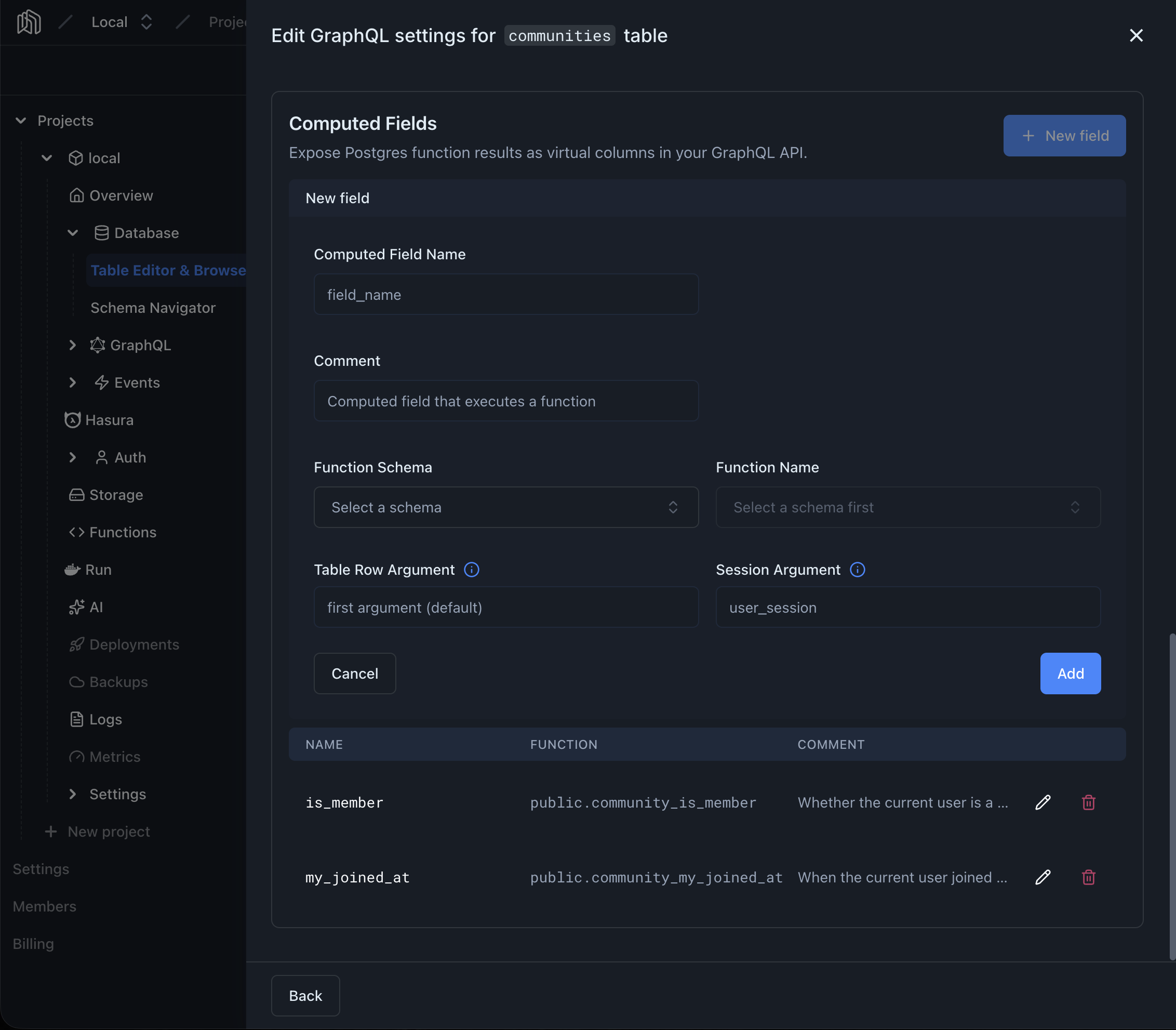
-
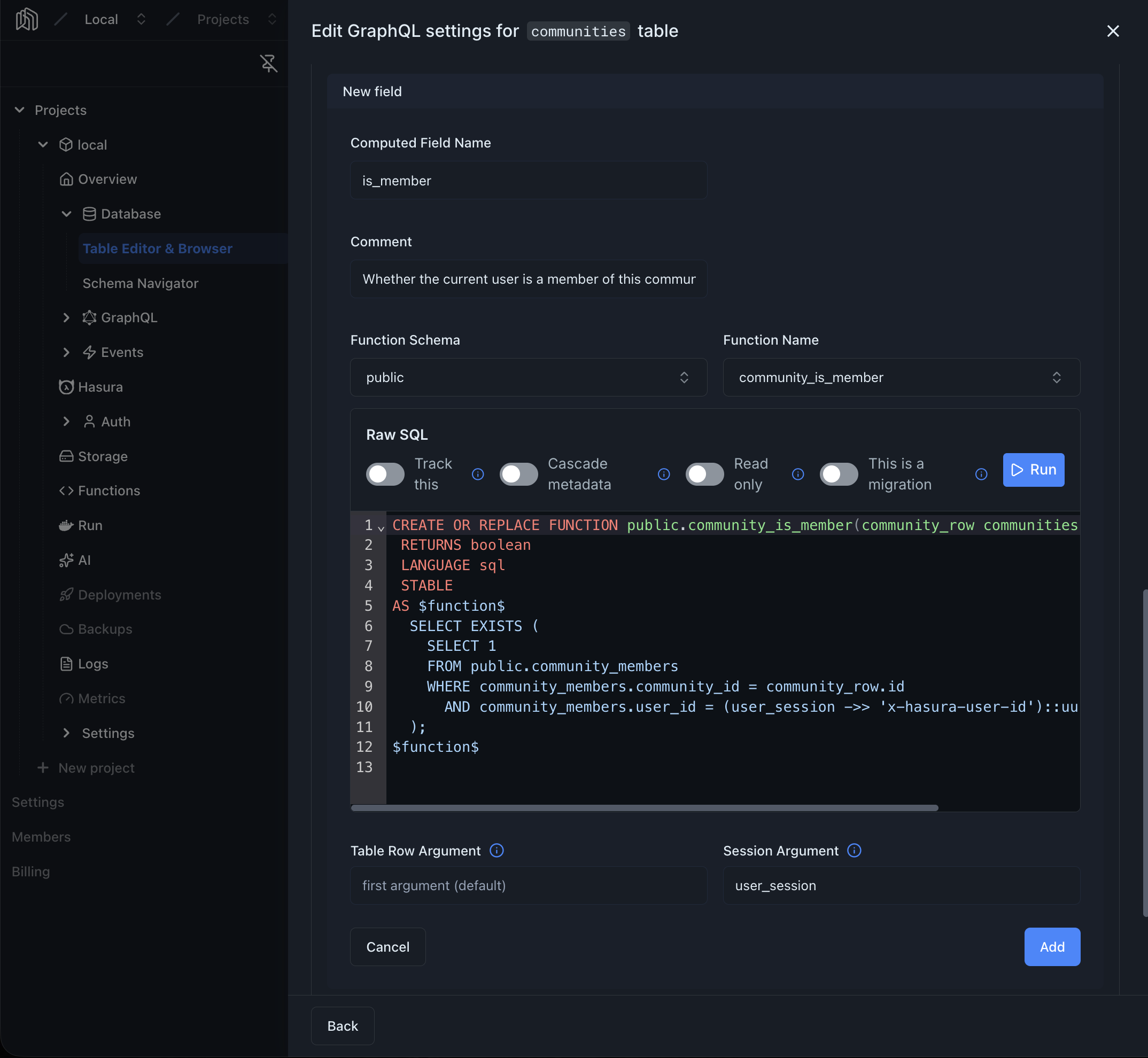
Fill in the form
-
3.1 Computed Field Name — how the field appears in the GraphQL schema. Must start with a letter or underscore, followed by letters, digits, or underscores.
-
3.2 Comment — optional. Surfaces as the field’s description in GraphQL introspection.
-
3.3 Function Schema and Function Name — pick the Postgres function that backs the field. Only functions that meet the requirements above appear in the list.
Need a new one? Type a name that doesn’t exist yet into Function Name and pick the Create function option that appears — a starter
CREATE FUNCTIONtemplate loads into an SQL editor embedded below the pickers, with the row argument for the current table already wired up. Edit the body and click Run to create the function without leaving the form.Selecting an existing function loads its source SQL into the same inline editor, so you can review the definition — or tweak it and run the updated statement — before saving the field.
-
3.4 Table Row Argument — optional. Leave empty to use the function’s first argument; set it if the row is a different argument.
-
3.5 Session Argument — optional. The argument that receives the user session as JSON. When set, the function can read session variables like
x-hasura-user-id, and the argument is hidden from the GraphQL schema so clients don’t see it.
-
-
Add
Click Add. The field is now available in the GraphQL API.
Editing and Deleting
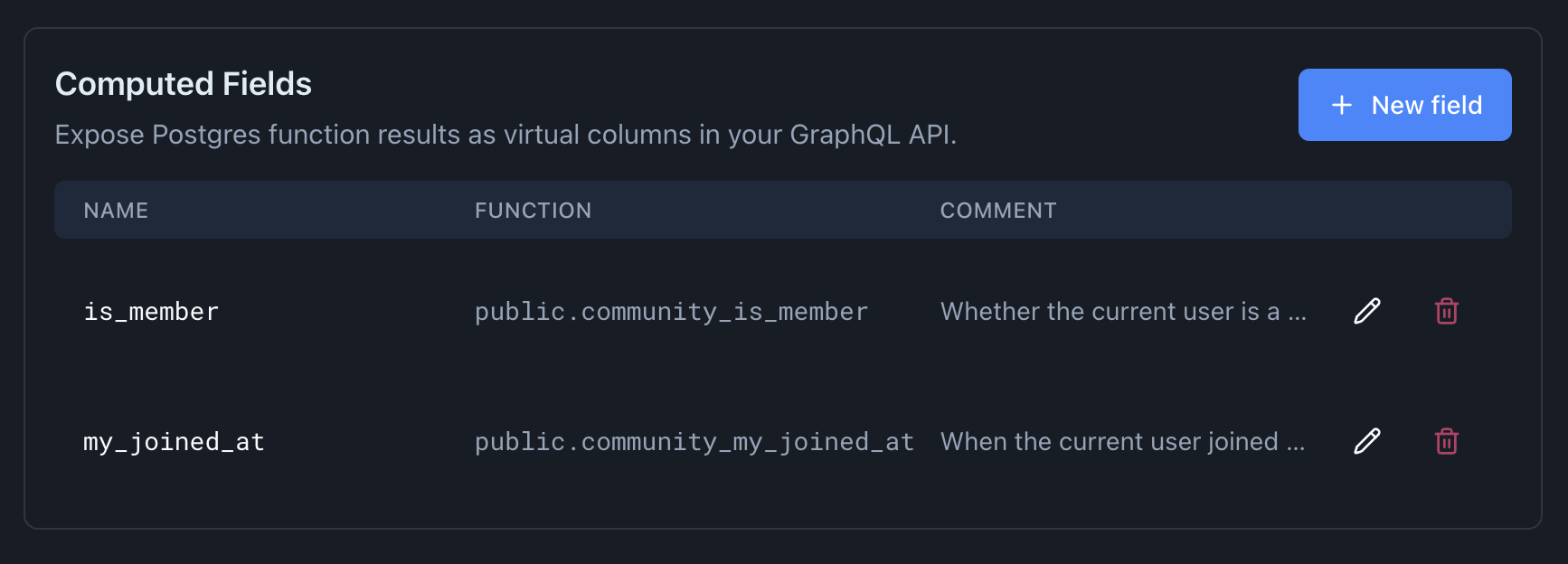
Section titled “Editing and Deleting”Each computed field row has two actions:
- Edit () — expands the row inline with the same form. Change any field and click Save, or Cancel to revert.
- Delete () — opens a confirmation dialog and removes the field. The underlying Postgres function is not dropped.
Querying
Section titled “Querying”A computed field appears in queries alongside regular columns. Given the full_name example above, you can select it like any other field:
query { users { id first_name last_name full_name # <-- computed field }}For a role to read a computed field, the field must be enabled in that role’s select permission on the table. See Permissions for how to configure column- and field-level access.
For a working example, see:
- Session-Aware Computed Fields — per-user membership state read from the session