

SMS OTP
Learn how to sign in users with one-time passwords delivered via SMS using Twilio.
SMS OTP phone mobile text message Twilio passwordless phone verification deanonymize change phone numberAn SMS OTP (one-time password) is a secure authentication method where a numeric or alphanumeric code is sent to a mobile phone number. Codes expire after 5 minutes and can only be used once.
Nhost supports OTP via SMS with Twilio.
Prerequisites
Section titled “Prerequisites”All SMS are sent through Twilio, so you need a Twilio account with:
- An Account SID and Auth Token (both on the Twilio Console home page).
- A Messaging Service SID (
MG…) or a Twilio phone number (+…) to send from.
Configuration
Section titled “Configuration”Enable the Phone Number (SMS) sign-in method and provide your Twilio credentials.
[auth.method.smsPasswordless]enabled = true
[provider.sms]provider = 'twilio'accountSid = '{{ secrets.TWILIO_ACCOUNT_SID }}'authToken = '{{ secrets.TWILIO_AUTH_TOKEN }}'# A Twilio phone number can be used instead of a Messaging Service SID.messagingServiceId = '{{ secrets.TWILIO_MESSAGING_SERVICE_ID }}'
Store sensitive values as secrets and reference them with {{ secrets.NAME }}.
In the Nhost Dashboard, go to Auth → Settings → Sign-In Methods → Phone Number (SMS).
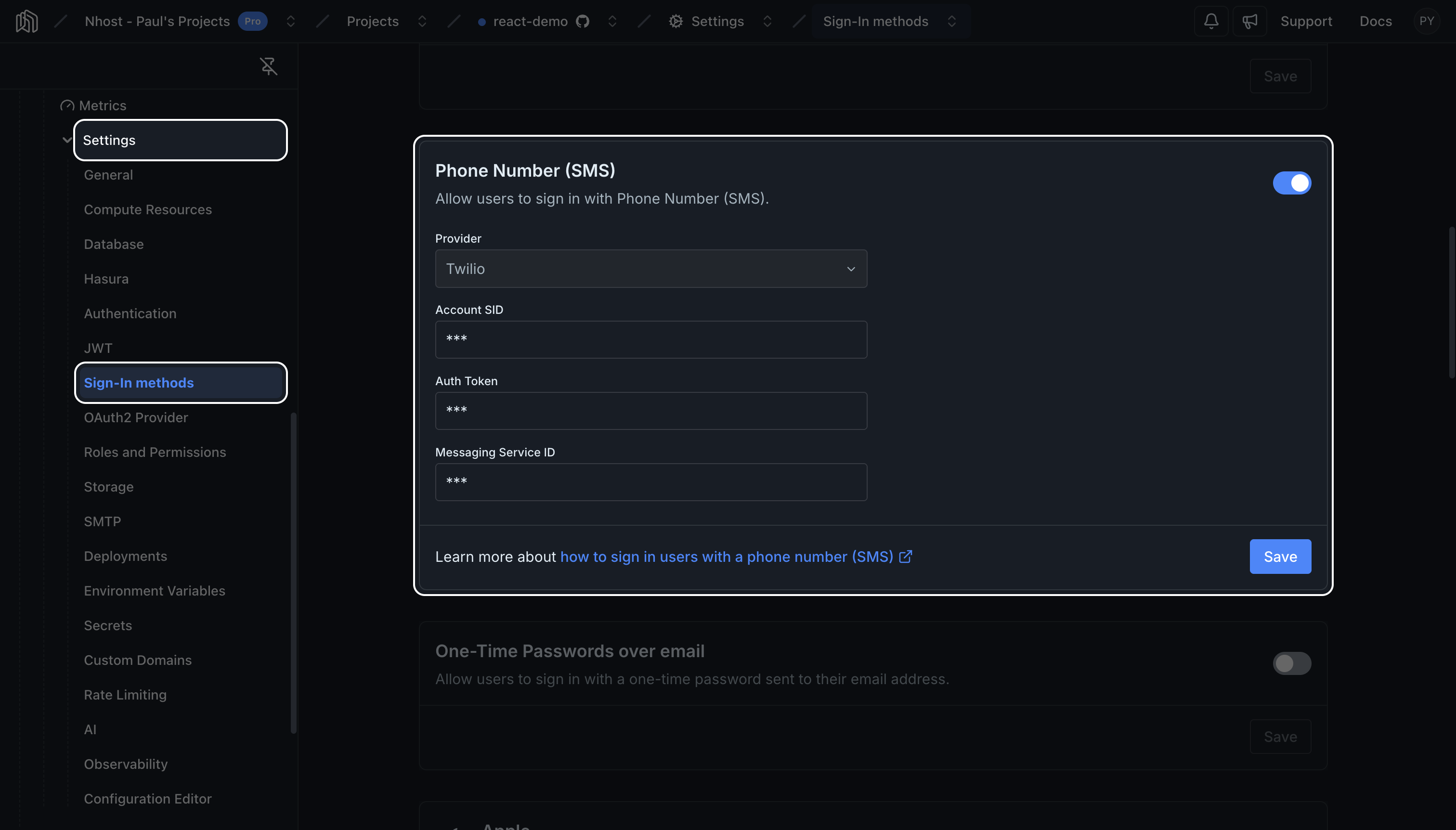
Turn on the toggle and fill in:
- Account SID
- Auth Token
- Messaging Service ID — a Messaging Service SID (
MG…) or a Twilio phone number
Sign In
Section titled “Sign In”Signing in users with a phone number is a two-step process:
Request OTP
Section titled “Request OTP”The user will receive the OTP on the phone number specified.
await nhost.auth.signInPasswordlessSms({ phoneNumber: '+11233213123'})await nhost.auth.signInWithSmsPasswordless( phoneNumber: '+11233213123')Sign In with OTP
Section titled “Sign In with OTP”To sign in the user, pass in the OTP received on the previous step.
await nhost.auth.verifySignInPasswordlessSms({ phoneNumber: '+11233213123', otp: '123456'})await nhost.auth.completeSmsPasswordlessSignIn( '+11233213123', '123456')Sign In Flow
Section titled “Sign In Flow”sequenceDiagram autonumber actor U as User participant C as Client participant A as Nhost Auth participant S as SMS Provider (Twilio) U->>C: Enter phone number C->>+A: POST /signin/passwordless/sms Note right of C: phoneNumber opt No user found A->>A: Create user end A->>A: Generate OTP (store hash, 5 min expiry) A-)S: Send SMS with code A->>-C: OK S-)U: Receive SMS U->>C: Enter OTP C->>+A: POST /signin/passwordless/sms/otp Note right of C: phoneNumber, otp A->>A: Validate OTP (unexpired, single-use) A->>A: Mark phone number verified A->>-C: Session (access + refresh tokens)Change Phone Number
Section titled “Change Phone Number”An authenticated user can change the phone number on their account. This is a two-step flow: the user requests the change, an OTP is sent via SMS to the new number, and the user submits the OTP to confirm. The current phone number is left unchanged until verification succeeds.
Both endpoints require elevated permissions when auth.elevatedPrivileges.mode is required, or when it is recommended and the user has a security key. With the default disabled mode no elevated claim is needed.
Request the Change
Section titled “Request the Change”await nhost.auth.changeUserPhoneNumber({ newPhoneNumber: '+11233213123'})Verify the Change
Section titled “Verify the Change”Submit the OTP received via SMS to commit the new number:
await nhost.auth.verifyChangeUserPhoneNumber({ newPhoneNumber: '+11233213123', otp: '123456'})Deanonymize with SMS
Section titled “Deanonymize with SMS”Anonymous users can be converted to permanent accounts by linking a phone number. An OTP is sent to the new number; the user completes the conversion by signing in with the OTP via the standard SMS sign-in flow, which also returns a non-anonymous session.
// 1. Anonymous user requests deanonymization with a phone numberawait nhost.auth.deanonymizeUserSms({  phoneNumber: '+11233213123'})
// 2. The same user verifies the OTP via verifySignInPasswordlessSms —//    on success the phone number is verified and a non-anonymous session is returnedawait nhost.auth.verifySignInPasswordlessSms({  phoneNumber: '+11233213123',  otp: '123456'})